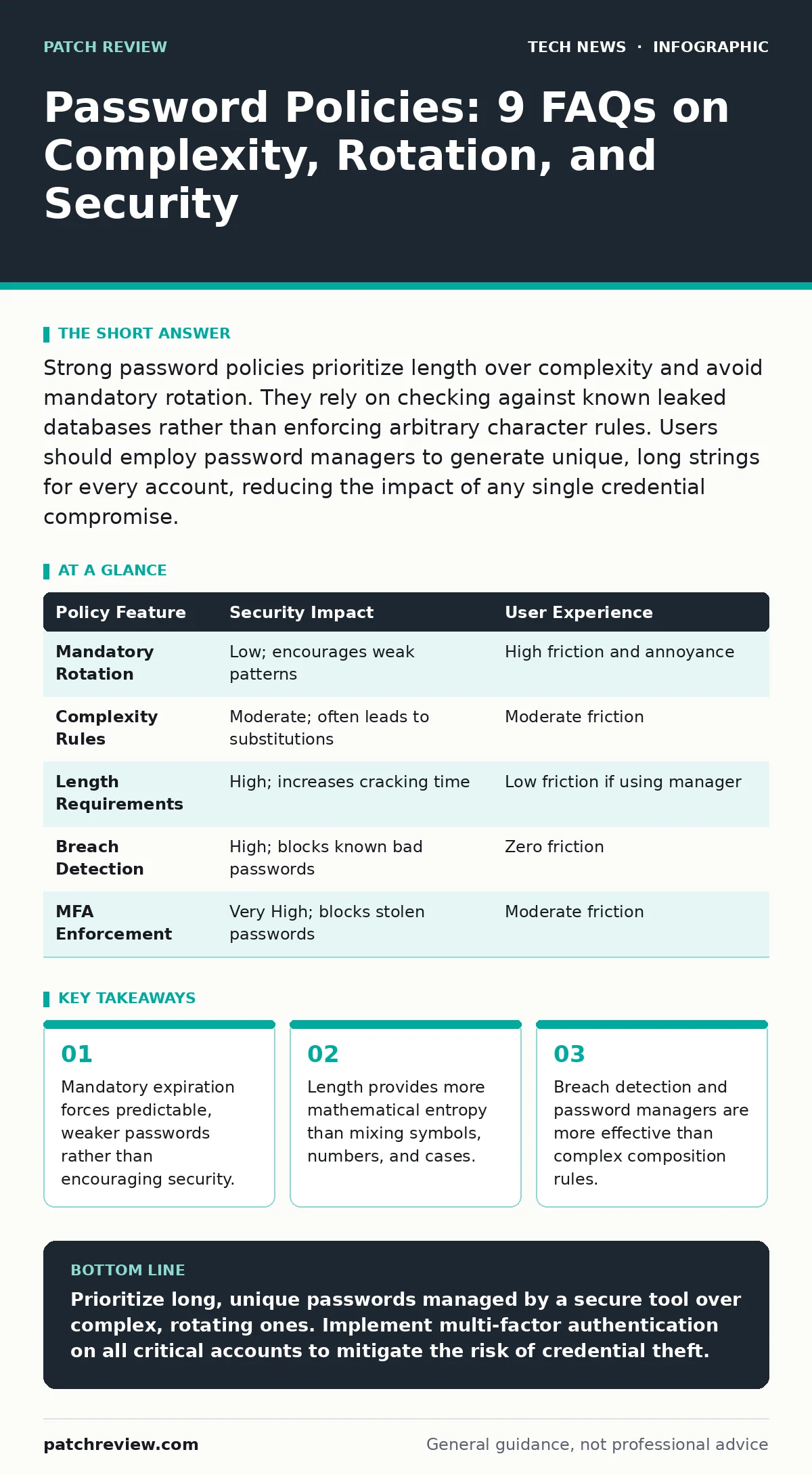
Strong password policies prioritize length over complexity and avoid mandatory rotation. They rely on checking against known leaked databases rather than enforcing arbitrary character rules. Users should employ password managers to generate unique, long strings for every account, reducing the impact of any single credential compromise.
Does forcing password expiration improve security?
No, mandatory password rotation generally reduces security by encouraging predictable behavior. When you know a password will expire soon, you are less likely to choose a strong, unique credential. Instead, you tend to make minor, predictable changes to the previous password, such as incrementing a number or swapping a single letter. This pattern makes the credential easier for attackers to guess or crack using heuristic algorithms.
The security community has moved away from this practice because it creates a false sense of safety. It assumes that if a password is stolen, the attacker will wait until the expiration date to use it. In reality, automated tools harvest credentials and test them immediately. Forcing frequent changes adds administrative burden without stopping automated attacks.
Should passwords require special characters and numbers?
Complexity requirements are less effective than simply requiring longer passwords. Adding a symbol or number increases the possible combinations, but not nearly as much as adding a single letter. A twelve-character lowercase password offers more resistance to brute-force attacks than an eight-character password with mixed types.
Mandating special characters often leads to users adopting predictable substitutions. You might see "P@ssw0rd!" or "Summer2024!" repeated across multiple accounts. These patterns are well-known to attackers and are included in default cracking dictionaries. It is better to ask for a long passphrase of random words than a short string with forced complexity.
How many characters make a password strong?
Aim for at least twelve characters, with sixteen being ideal for high-value accounts. Length is the primary factor in resisting brute-force attacks, which try every possible combination. Each additional character exponentially increases the time required to crack the credential.
Short passwords are vulnerable even if they contain symbols. An eight-character password can be cracked in seconds by modern hardware. A fifteen-character random string would take millennia to break using the same resources. Focus on length first, then ensure the characters are random rather than forming a common phrase.
Is it safe to reuse passwords across different sites?
Never reuse passwords, as a breach on one site exposes all your other accounts. Attackers often take stolen credentials and try them on popular services like email, banking, or social media. This technique, known as credential stuffing, succeeds because many users assume their less critical accounts are safe.
If you cannot use a unique password for every account, prioritize critical services. Email and financial accounts should have credentials that are used nowhere else. For low-risk forums or news sites, you can use a dedicated "junk" password, but it must never be the same as your primary identity or banking credentials.
Do password managers create a single point of failure?
Password managers centralize your credentials, which creates a specific risk profile. If your master password is weak or your device is compromised, an attacker gains access to everything. However, this risk is lower than the alternative of reusing weak passwords across dozens of sites.
Most password managers use AES encryption to protect the stored data. This means that even if the database is stolen, the passwords remain unreadable without your master key. The security depends entirely on the strength of your master password and your use of multi-factor authentication on the manager itself.
See also: OAuth vs OpenID: The Core Difference for Secure Authentication · How Passkeys Work: The Cryptographic Mechanics Behind Passwordless Login
What is the role of multi-factor authentication?
Multi-factor authentication adds a second layer of verification, such as a code from an app or a hardware token. Even if an attacker steals your password, they cannot log in without this second factor. It effectively neutralizes the threat of password reuse and weak credentials.
SMS-based codes are less secure than authenticator apps or hardware keys. Phone numbers can be ported to new devices by attackers through social engineering. Using a dedicated app or physical device ensures that the second factor remains under your physical control.
Should I use a passphrase instead of a password?
Passphrases are often more secure and easier to remember than random strings. A sequence of four random words creates a long credential that is difficult to crack but simple to type. For example, "correct horse battery staple" is stronger than "Tr0ub4dor&3".
The key is that the words must be random. Common phrases or quotes are found in dictionaries used by cracking software. Selecting words randomly ensures high entropy. This approach balances usability with security, reducing the likelihood that you will write the credential down.
How do organizations check for compromised passwords?
Organizations should check new passwords against databases of known leaked credentials. This process, called breach detection, prevents users from selecting passwords that have already been exposed. It is more effective than enforcing arbitrary complexity rules.
This check happens locally or via a secure hash comparison. The actual password is never sent to the checking service. Instead, a hash is compared against a list of known bad hashes. This protects user privacy while ensuring that compromised credentials are not reused.
| Policy Feature | Security Impact | User Experience |
|---|---|---|
| Mandatory Rotation | Low; encourages weak patterns | High friction and annoyance |
| Complexity Rules | Moderate; often leads to substitutions | Moderate friction |
| Length Requirements | High; increases cracking time | Low friction if using manager |
| Breach Detection | High; blocks known bad passwords | Zero friction |
| MFA Enforcement | Very High; blocks stolen passwords | Moderate friction |
Can biometrics replace passwords entirely?
Biometrics, such as fingerprints or facial recognition, are convenient but not a full replacement. They are factors of authentication, not secrets you control. You cannot change your fingerprint if it is compromised.
Biometrics should be used as a second factor or to unlock a local device. They work well with password managers, allowing quick access to your vault. However, for remote access, a traditional password or hardware key remains necessary for true non-repudiation and revocability.
Key takeaways
- Mandatory expiration forces predictable, weaker passwords rather than encouraging security.
- Length provides more mathematical entropy than mixing symbols, numbers, and cases.
- Breach detection and password managers are more effective than complex composition rules.
Prioritize long, unique passwords managed by a secure tool over complex, rotating ones. Implement multi-factor authentication on all critical accounts to mitigate the risk of credential theft.
Frequently asked questions
How often should I change my password?
Only change it if you suspect it has been compromised or if the service provider notifies you of a breach. Otherwise, keep a strong, unique password indefinitely.
Are password managers safe from hackers?
They are highly secure when used with a strong master password and multi-factor authentication. The encryption ensures that even if the service is breached, your data remains protected.
What is the best type of multi-factor authentication?
Hardware security keys and authenticator apps are the most secure. Avoid SMS-based codes whenever possible, as they are vulnerable to SIM swapping attacks.
Can I use a password manager on my phone?
Yes, and you should. Mobile devices are common targets for credential theft. Using a manager ensures you do not reuse passwords on public Wi-Fi or less secure apps.
How this guide was produced: written by the Patch Review editorial team with AI assistance, checked against the public references listed below, and reviewed when the facts change. See our editorial policy or report an error.