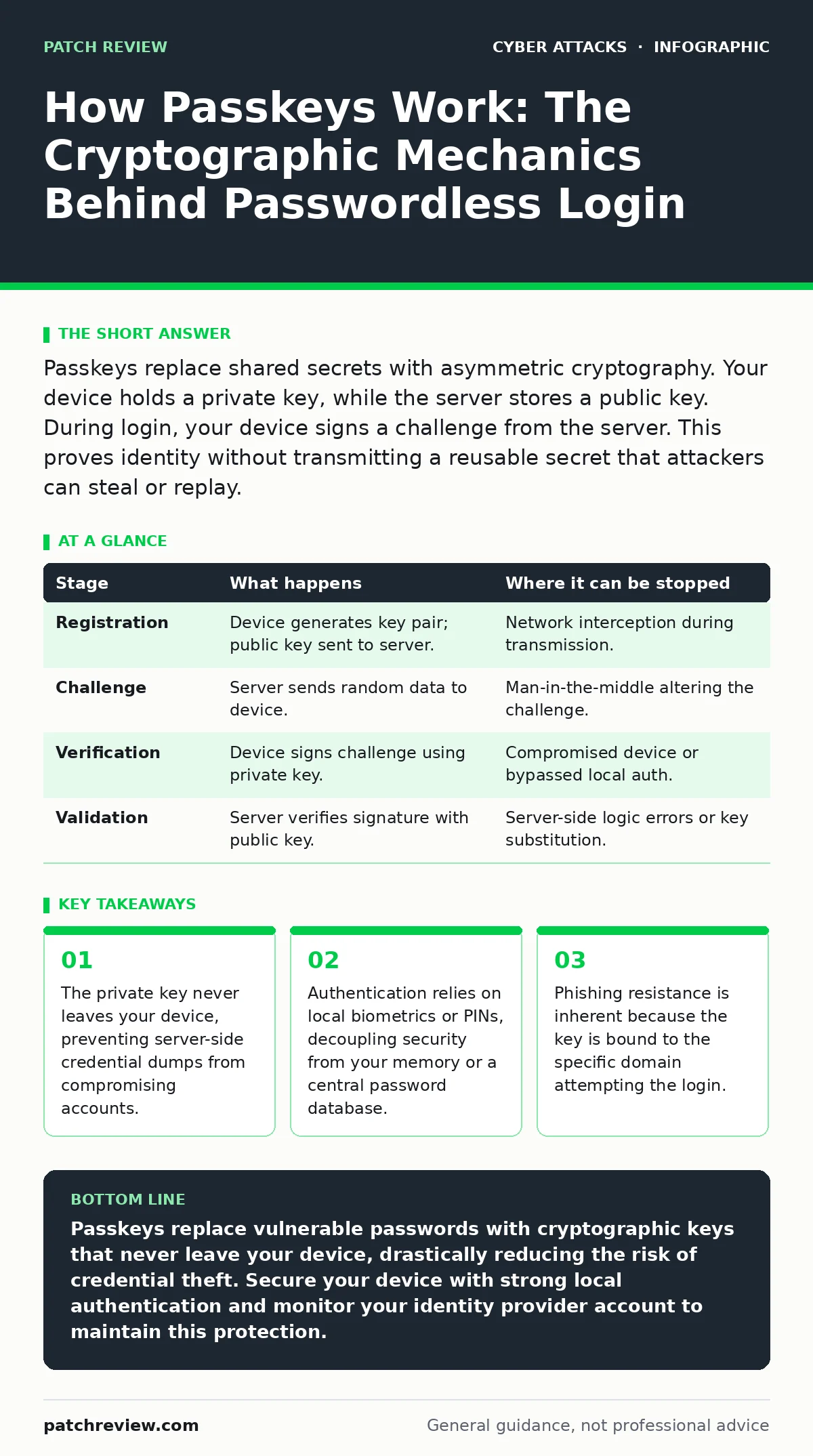
Passkeys replace shared secrets with asymmetric cryptography. Your device holds a private key, while the server stores a public key. During login, your device signs a challenge from the server. This proves identity without transmitting a reusable secret that attackers can steal or replay.
The Shift from Shared Secrets
Traditional authentication relies on a shared secret. You know a password, and the server knows the same password. Both sides must protect it. If an attacker steals the server’s database, they gain access to every account. Passkeys change this dynamic entirely. They use asymmetric cryptography, a system involving two mathematically linked keys. One key is public, and the other is private.
The public key can encrypt data or verify signatures, but the private key is required to decrypt or sign. You keep the private key. The server holds the public key. This separation means the server never knows your private key. Even if the server is compromised, the attacker cannot log in as you. They only have the public key, which is useless without its private counterpart. This mechanism removes the single point of failure inherent in password databases.
### Stage 1: Registration and Key Generation
When you create a passkey, your device generates a new key pair. The private key stays on your device, often within a secure hardware enclave. The public key travels to the service provider. The server stores this public key along with metadata about your device. This metadata helps the server recognize your device later. It does not contain sensitive personal information. Instead, it contains technical identifiers.
The server now expects a digital signature from this specific private key for future logins. This process happens locally on your hardware. No third party sees the private key. The connection between you and the service is established through this cryptographic handshake. You are no longer sending a secret over the network. You are establishing a trust relationship based on mathematical proof.
### Stage 2: The Authentication Challenge
When you attempt to log in, the server initiates the process. It sends a cryptographic challenge to your device. This challenge is a random string of data. It ensures that each login attempt is unique. This prevents replay attacks, where an attacker intercepts a valid authentication message and resends it later. The server expects your device to sign this specific challenge.
If the server received a signature for a different challenge, it would reject the login. This binding to a specific session is critical. It ensures that the proof of identity is fresh and valid for that moment only. The server waits for the response. It does not send any credentials. It simply asks for proof that you hold the private key associated with the stored public key.
### Stage 3: Local User Verification
Your device receives the challenge. It now needs to prove ownership of the private key. However, it cannot just use the key automatically. It must verify that you are the authorized user. This is where local authentication comes in. You might use a fingerprint, facial recognition, or a PIN. This step happens entirely on your device. The biometric sensor or PIN interface talks to the secure enclave. The secure enclave checks if the input matches the enrolled user.
If it matches, the secure enclave uses the private key to sign the challenge. The private key never leaves the secure hardware. It performs the mathematical operation internally. The output is the digital signature. This signature is the only thing that leaves the secure area. This design ensures that even if your operating system is compromised, the attacker cannot extract the private key. They can only try to trick you into signing something.
### Stage 4: Verification and Access
The signed challenge travels back to the server. The server uses the stored public key to verify the signature. If the signature is valid, the server knows two things. First, the sender holds the private key. Second, the sender signed the exact challenge the server issued. This confirms the identity and the freshness of the request. The server grants access. No password was transmitted.
No reusable secret was exposed. The entire exchange is cryptographically secure. This process is invisible to you. You simply unlock your device and the login succeeds. The complexity is hidden behind the user interface. But the security guarantees are stronger than any password-based system. The server cannot be tricked by a stolen password because there is no password to steal.
See also: Side-Channel Attack Prevention: Constant-Time Code and Noise · Hardware Security Modules: 8 Questions Answered
Understanding the Limits and Risks
Passkeys are not a magic bullet. They rely on the security of your device. If your device is lost or stolen, an attacker with physical access might attempt to bypass local verification. Strong local authentication is required. You must use a PIN or biometric that is difficult to guess or spoof. Without this, the passkey offers no protection. Imagine an attacker steals your laptop.
If your laptop has no screen lock, they can use your passkeys immediately. The cryptographic strength is irrelevant if the local gatekeeper is bypassed. You must treat your device as a credential itself. Losing it is as serious as losing a key to a safe. Recovery processes exist, but they add complexity. You must have a way to prove your identity to restore access if your device is gone.
### Stage 5: Sync and Recovery
Modern passkey systems often sync keys across devices. This convenience introduces new risks. If your cloud sync account is compromised, an attacker might access your passkeys. This shifts the risk from the service provider to your identity provider. You must secure the account that manages your passkeys. This often means using a second passkey or strong multi-factor authentication for your cloud account.
The attack surface moves. It does not disappear. You trade the risk of a service breach for the risk of an identity provider breach. This trade-off is generally favorable. Identity providers are heavily scrutinized. But it requires vigilance. You must monitor your primary identity account for unusual activity. Login alerts for your cloud account become a critical defense layer.
Table: The Passkey Lifecycle
| Stage | What happens | Where it can be stopped |
|---|---|---|
| Registration | Device generates key pair; public key sent to server. | Network interception during transmission. |
| Challenge | Server sends random data to device. | Man-in-the-middle altering the challenge. |
| Verification | Device signs challenge using private key. | Compromised device or bypassed local auth. |
| Validation | Server verifies signature with public key. | Server-side logic errors or key substitution. |
Hidden Costs and Edge Cases
One unexpected consequence is the loss of universal usability. Passkeys require compatible hardware and software. Older devices cannot participate. This creates a fragmentation in the user experience. You may need fallback methods for legacy systems. These fallbacks often revert to passwords or SMS codes. These alternatives are weaker. They undermine the security gains of passkeys.
You must manage these exceptions carefully. Another hidden cost is the reliance on the platform provider. Apple, Google, and Microsoft control the implementation. If one platform makes a mistake, millions of users are affected. You have little control over these underlying systems. You must trust the platform vendors to maintain security. This centralization is a trade-off for ease of use.
Integration with Existing Defenses
Passkeys do not replace all security measures. They work best when combined with other controls. Conditional access policies can restrict where passkeys can be used. For example, you might allow passkey logins only from trusted networks. This adds a layer of context-aware security. It reduces the risk of compromised keys being used from unusual locations. Similarly, monitoring for web skimming remains relevant. Passkeys protect login, but not data displayed on the page. Attackers can still inject malicious scripts into compromised sites. These scripts can steal session data after you log in. You must still secure the application layer. Passkeys secure the door, not the house.
The Future of Authentication
The industry is moving toward passwordless. Passkeys are the current standard. They offer a strong balance of security and usability. They eliminate the most common attack vector: stolen passwords. By removing the shared secret, they remove the incentive for large-scale credential harvesting. Attackers must now target individual devices. This is harder and less scalable.
It raises the cost of attack significantly. However, users must adapt. You must manage your devices as security assets. You must understand that your device is now your key. Lose it, and you lose access. Steal it, and you risk compromise. The responsibility shifts from memorizing secrets to protecting hardware. This is a fundamental change in how we think about identity.
Key takeaways
- The private key never leaves your device, preventing server-side credential dumps from compromising accounts.
- Authentication relies on local biometrics or PINs, decoupling security from your memory or a central password database.
- Phishing resistance is inherent because the key is bound to the specific domain attempting the login.
Passkeys replace vulnerable passwords with cryptographic keys that never leave your device, drastically reducing the risk of credential theft. Secure your device with strong local authentication and monitor your identity provider account to maintain this protection.
Frequently asked questions
Can hackers steal my passkey?
No, the private key never leaves your device. Attackers can only steal the public key, which is useless for logging in. They must compromise your device directly.
What happens if I lose my phone?
You lose access to the passkeys stored on that device. You must use a recovery method, such as a synced passkey on another device or a backup code, to regain access.
Do passkeys work offline?
Yes, the signing process happens locally. However, the initial registration and final verification require an internet connection to communicate with the server.
Are passkeys better than two-factor authentication?
Passkeys combine something you have (device) and something you are (biometric). They are generally more secure and convenient than traditional two-factor methods because they resist phishing.
How this guide was produced: written by the Patch Review editorial team with AI assistance, checked against the public references listed below, and reviewed when the facts change. See our editorial policy or report an error.