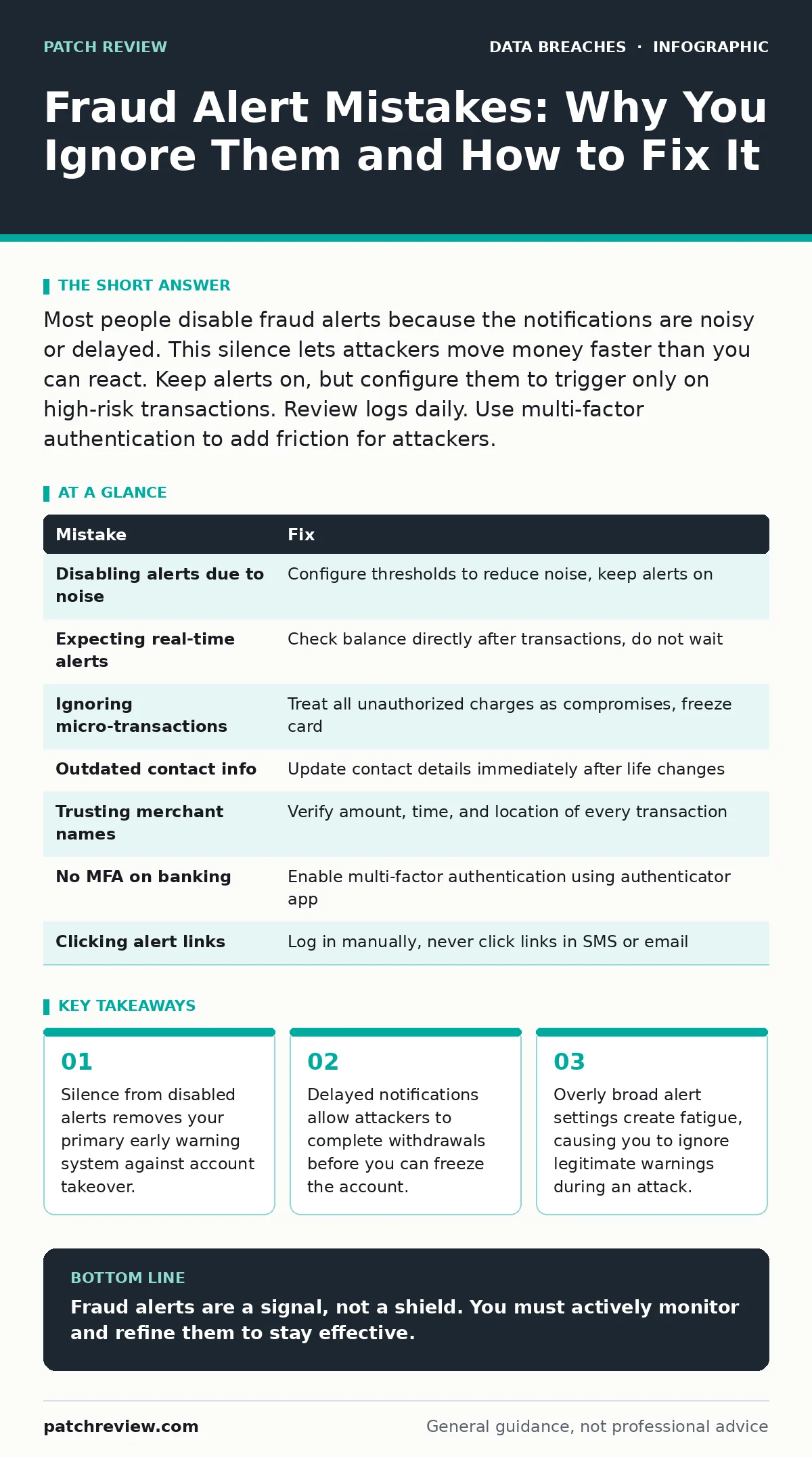
Most people disable fraud alerts because the notifications are noisy or delayed. This silence lets attackers move money faster than you can react. Keep alerts on, but configure them to trigger only on high-risk transactions. Review logs daily. Use multi-factor authentication to add friction for attackers.
Fraud alerts are automated signals triggered by unusual activity on your financial accounts. They are not a security control in themselves. They are a notification mechanism. Your reaction to these signals determines whether a suspicious login becomes a drained account. Most people mishandle these signals. They disable them due to noise. They ignore them due to delay. They treat them as final proof rather than initial data. Below are the specific ways this goes wrong and how to correct the behavior.
Mistake 1: Disabling Alerts Due to Notification Fatigue
You receive too many alerts for small purchases or password changes. You decide the noise is worse than the risk. You turn them off.
Why it hurts:
Silence is the attacker’s best friend. When you disable alerts, you remove the only external signal that something is wrong. An attacker can change your password, add a new device, and drain your balance without you knowing until you check your balance manually. This is a form of passive compromise. You are not being attacked in real-time. You are being ignored in real-time.
The fix:
Do not disable the alerts. Refine them. Most banking platforms allow you to set thresholds. Set alerts to trigger only on transactions above a specific amount, on new devices, or on changes to contact information. This reduces noise while keeping the signal clear for significant events. If your bank does not offer granular controls, switch to a bank that does.
Mistake 2: Relying on Real-Time Expectations for Batch-Processed Alerts
You assume that when a transaction happens, you get an alert instantly. You wait for the push notification to confirm a payment went through. You see nothing. You assume the payment failed or was declined.
Why it hurts:
Many financial institutions process alerts in batches, not in real-time. A delay of minutes or hours is common. By the time you receive the alert, the attacker has already moved the funds. You are reacting to a past event, not preventing a current one. This delay window is where the damage occurs. You cannot stop a transfer that has already settled.
The fix:
Check your account balance directly after any significant action. Do not wait for the notification. Treat the alert as a secondary confirmation, not the primary source of truth. If you suspect an error, look at the transaction history in the banking interface, not your phone’s notification center.
Mistake 3: Ignoring Low-Value Reconnaissance Transactions
You ignore it because the amount is trivial. You assume it is a test or a mistake.
Why it hurts:
Attackers often start with micro-transactions to verify that the card details are active and that the victim is not monitoring their account closely. This is called card testing. If you ignore these small alerts, you signal to the attacker that you are not watching. They will then proceed to larger transactions. The small charge is the probe. The large charge is the breach. Ignoring the probe guarantees the breach.
The fix:
Treat every unauthorized alert as a compromise, regardless of the amount. Freeze the card immediately. Contact the bank. Do not wait to see if they try again.
Mistake 4: Failing to Update Contact Information After Moving
You move to a new house or get a new phone number. You update your direct deposit information. You forget to update your bank’s contact details. You start receiving alerts on an old email or phone you no longer use.
Why it hurts:
You are blind to new activity. The attacker does not need to hack your bank. They just need to wait for you to stop seeing the alerts. This is a passive failure. You have not been breached. You have been disconnected. The bank is sending the signal. You are not receiving it. This is a common vector for child identity theft, where parents miss alerts for accounts opened in a minor’s name because the contact information is outdated.
The fix:
Update your contact information with every major life change. Treat your bank’s contact settings as critical infrastructure. Verify that you receive a test alert after updating your email or phone number. Keep a secondary email address dedicated to financial notifications that you check regularly.
Mistake 5: Assuming Alerts Mean the Transaction is Legitimate
You see an alert for a purchase at a grocery store. You recognize the store. You assume the transaction is legitimate. You do not check the amount or the time.
Why it hurts:
Attackers can use card-not-present fraud to mimic legitimate merchants. They may use a shell company with a name similar to a known brand. Or they may use a legitimate merchant’s terminal that has been compromised. Recognizing the name is not enough. You must verify the details. If you assume legitimacy based on a name, you miss the anomaly.
The fix:
Verify the amount, time, and location of every alert. If you were not at the store at that time, it is fraud. If the amount does not match your memory, it is fraud. Do not rely on merchant name recognition alone. Cross-reference the alert with your own activity log.
See also: Chain of Custody Form: How to Preserve Digital Evidence Integrity · Secure Data Disposal: FAQs on Sanitization and Media Destruction
Mistake 6: Not Using Multi-Factor Authentication for Alert Management
You receive an alert that your password was changed. You assume it was you, but you forgot. You do not check the security settings. You do not enable multi-factor authentication.
Why it hurts:
If an attacker can change your password, they can also disable your alerts. Without multi-factor authentication, a stolen password gives the attacker full control. They can turn off the alarms before they ring. This is a complete account takeover. Multi-factor authentication adds a layer of friction that prevents attackers from changing settings even if they have your password.
The fix:
Enable multi-factor authentication on your banking app and website. Use an authenticator app or hardware key, not SMS, if possible. This ensures that even if your password is stolen, the attacker cannot disable your alerts or change your contact information.
Mistake 7: Ignoring the Source of the Alert
You receive an SMS claiming to be from your bank about a fraud alert. You click the link to resolve it. You enter your credentials on the fake site.
Why it hurts:
This is a phishing attack. The attacker is using the concept of a fraud alert to trick you into giving up your credentials. The alert is not from your bank. The link is not to your bank. You are handing over the keys to your house to someone who knocked on the door pretending to be the landlord. This is a common tactic in third-party data breaches, where attackers use leaked data to make the phishing attempt look more credible.
The fix:
Never click links in fraud alerts. Always log in to your bank through the official app or by typing the URL manually. If you receive an SMS, call the number on the back of your card to verify. Do not use the number in the SMS.
| Mistake | Fix |
|---|---|
| Disabling alerts due to noise | Configure thresholds to reduce noise, keep alerts on |
| Expecting real-time alerts | Check balance directly after transactions, do not wait |
| Ignoring micro-transactions | Treat all unauthorized charges as compromises, freeze card |
| Outdated contact info | Update contact details immediately after life changes |
| Trusting merchant names | Verify amount, time, and location of every transaction |
| No MFA on banking | Enable multi-factor authentication using authenticator app |
| Clicking alert links | Log in manually, never click links in SMS or email |
Key takeaways
- Silence from disabled alerts removes your primary early warning system against account takeover.
- Delayed notifications allow attackers to complete withdrawals before you can freeze the account.
- Overly broad alert settings create fatigue, causing you to ignore legitimate warnings during an attack.
Fraud alerts are a signal, not a shield. You must actively monitor and refine them to stay effective.
Frequently asked questions
Can I trust SMS alerts from my bank?
Only if you initiated the request. If you receive an unexpected SMS, do not click any links. Log in to your bank through the official app to check the alert status.
What if I missed an alert because my phone was off?
Log in to your banking app immediately and check the transaction history. Look for any unfamiliar charges or changes to your account settings.
Should I freeze my card if I see a small unauthorized charge?
Yes. A small charge indicates that your card details are active and the attacker is testing them. Freezing the card prevents larger transactions from succeeding.
How this guide was produced: written by the Patch Review editorial team with AI assistance, checked against the public references listed below, and reviewed when the facts change. See our editorial policy or report an error.